Chattybot 8.4

Our chatbots are moving to version 8.4.
MCP and tool integration
Version 0.8.4 introduces improved tool integration, notably through MCPs.
- Ability to connect external services (Atlassian, GitLab, etc.)
- Trigger tools directly from a conversation
- Improved orchestration between the model and tools
👉 The chatbot no longer just answers: it can retrieve information and execute actions.
Console interconnection
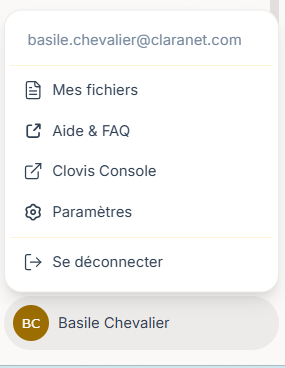
This update also introduces a more direct interconnection between the chatbot and the administration console.
- Access to the console directly from the chatbot
- View personal usage statistics
- Manage and create API keys
👉 Users can now move from the chat to the administration space and manage their usage autonomously.
Long conversation management
The maximum conversation context has been increased, with improved display and navigation:
- Better handling of long conversations
- Progressive message loading
- Smoother navigation through conversation history
👉 The chatbot can now be used for longer and more complex exchanges than before.
Document processing
Document management has been improved to support concrete use cases:
- Improved support for PDF, Word, Excel, and OpenDocument files
- Targeted information extraction
- Generation of directly usable summaries
Enhanced Security
This version upgrade includes a significant hardening effort for the Chattybot foundation, based on the latest improvements introduced in LibreChat 0.8.4.
Concretely, this update brings more than 30 security and stability fixes, particularly around permission management, OpenID/OAuth authentication, access to agents and MCP tools, as well as certain request limitation and control mechanisms.
Several protections have also been strengthened around document handling and generated content, in order to better manage imported files, artifact rendering, and edge cases that could lead to unwanted behaviors.
Unified Template and Client Customization
We have also harmonized the visual integration of our different Chattybot instances through a unified template.
This new template helps reduce design conflicts that could previously occur during interface integration or customization. It provides a cleaner, more consistent foundation that is easier to maintain.
👉 The goal is to offer a more homogeneous experience while preserving tailored customization.