API Access from RooCode
RooCode is an extension for your IDE (especially VS Code) that allows you to use an AI model directly within your development environment.
It can:
generate code
explain code
refactor
document
and all of this without leaving your editor.
Installing RooCode (VS Code)

- Open VS Code.
- Go to Extensions (square icon on the left or
Ctrl+Shift+X). - Search for
"RooCode"in the search bar. - Click Install.
Warning
Make sure your VS Code version is ≥ 1.70 to ensure compatibility.
Configuring RooCode
-
Open VS Code.
-
In the sidebar, click Extensions (square icon) or use the shortcut
Ctrl+Shift+X. -
In the search bar, type "RooCode" and press enter.
-
In the results, click the Install button.
-
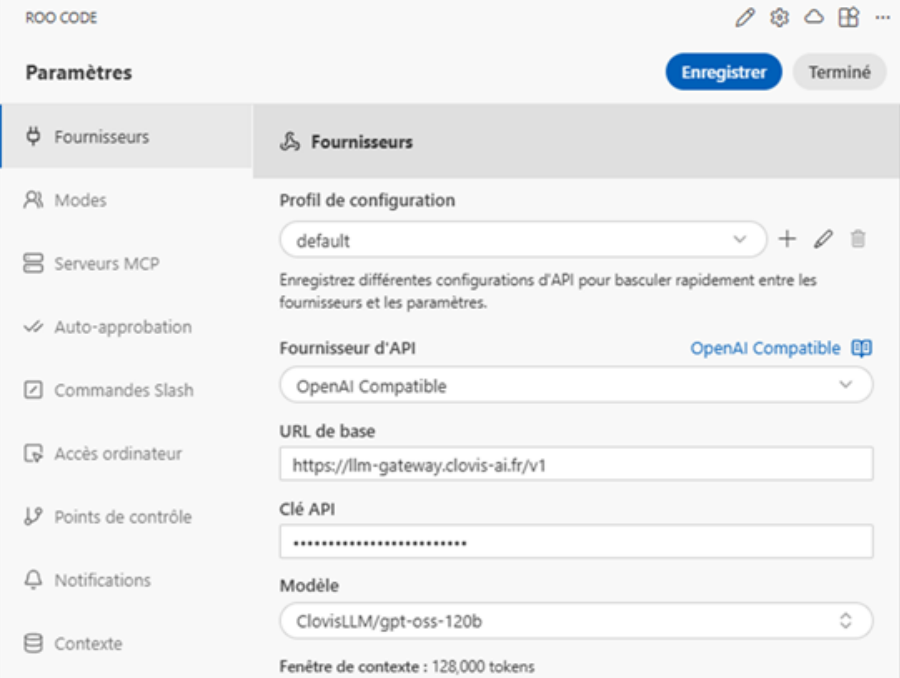
In the “Providers” section, fill in the following fields:
| Field | Expected value |
|---|---|
| API Base URL | the OpenAI-compatible endpoint of Clovis |
| API Key | your access key (keep it secret) |
| Model | the Clovis model you want to use (e.g. ClovisLLM) |
- Save the changes (the Save button or
Ctrl+S).