Agents
An agent combines a model with instructions and, when needed, context files, skills, and MCP servers. It is designed for a specific task or role and produces more consistent responses than an unconfigured conversation.
Use an existing agent
- Open the selector above the conversation.
- Choose an agent you have access to.
- Review its name and description to confirm its scope.
- Enter your request and provide any information it does not already have.
The agents displayed depend on your organization's sharing settings and permissions.
Create an agent
From the Agents section, select Create a new agent.
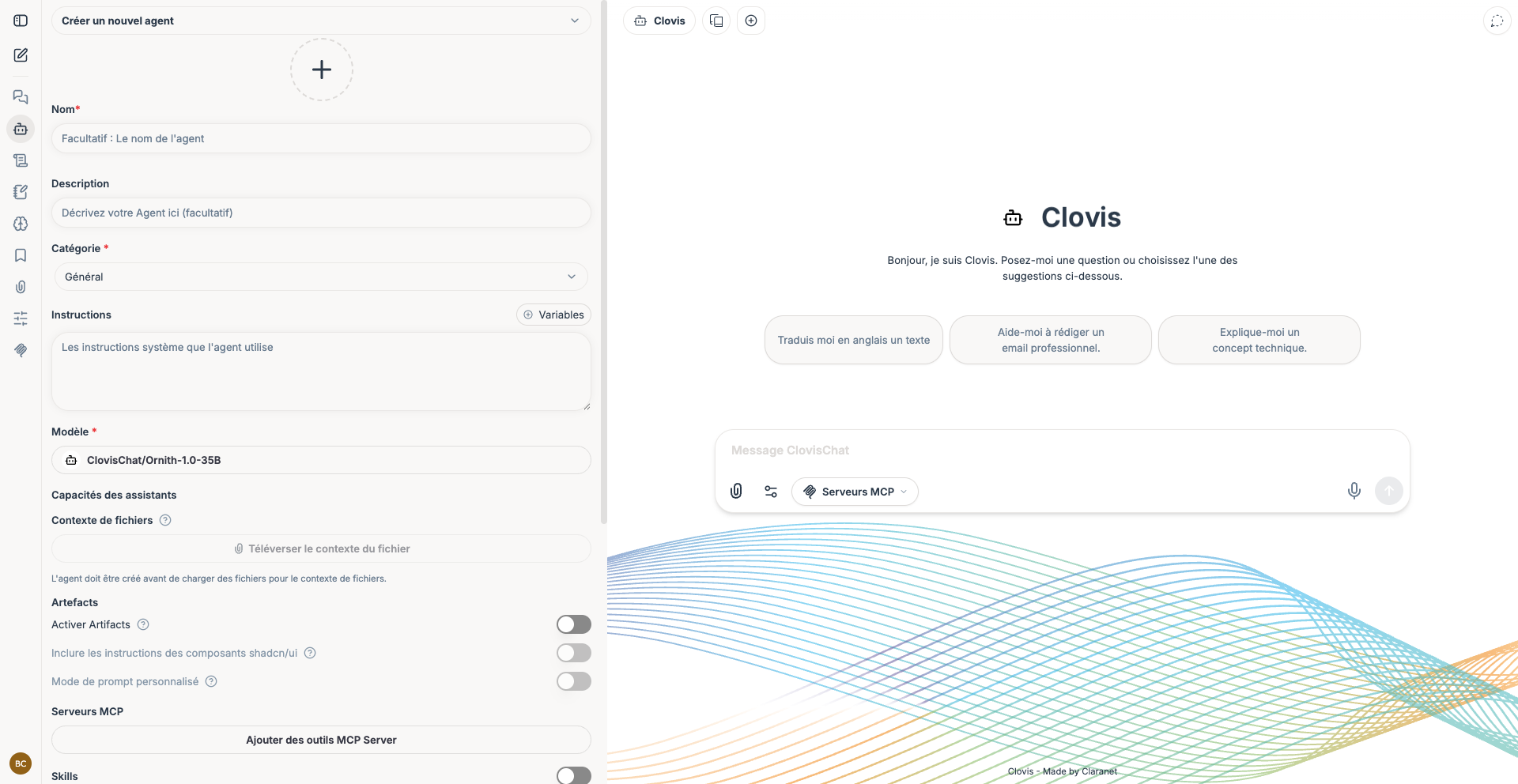
Complete the following fields:
| Setting | Recommendation |
|---|---|
| Name | Use a clear name focused on the intended use. |
| Description | State who the agent is for and what it can do. |
| Category | Categorize the agent to make it easier to find. |
| Instructions | Describe its role, rules, tone, and expected response format. |
| Model | Select the model best suited to the task. |
| File context | Add only the authorized and necessary reference documents. |
| Skills | Enable reusable capabilities that guide specific tasks. |
| MCP servers | Provide access only to the external tools or sources that are necessary. |
Create the agent before uploading its context files if prompted by the interface.
Test and maintain an agent
- Try standard, ambiguous, and out-of-scope requests.
- Check that the agent uses the correct sources and follows the requested format.
- Refine its instructions instead of adding conflicting rules.
- Check permissions before sharing it.
- Update or remove files, skills, and tools that are no longer needed.
An agent is not a substitute for human review. Take particular care when testing use cases with legal, financial, medical, or operational consequences.
Next, learn how to configure its skills and MCP servers.
Agent examples
| Agent | Purpose | What to prepare |
|---|---|---|
| HR assistant | Answer common questions about leave, benefits, procedures, and internal policies. | Instructions defining its scope, up-to-date HR documents, confidentiality rules, and guidance to refer users to a person when in doubt. |
| IT support assistant | Diagnose common incidents and guide users through approved procedures. | The support knowledge base, diagnostic steps, limits on permitted actions, and optionally an MCP server connected to the ticketing tool. |
| Project management assistant | Summarize meetings, prepare follow-ups, and find project decisions. | Writing conventions, project documents, and, when available, a Confluence or GitHub MCP server limited to the relevant spaces. |
Start each agent with a narrow scope and reliable sources. Add skills or MCP servers only after confirming a concrete need.