MCP
MCP servers connect Clovis to tools or data sources authorized by your organization. For example, they can search for information in a business service or perform an action exposed by that service.
Enable a server in a conversation
- In the input area, select MCP Servers.
- Enable only the server or servers needed for your task.
- Write a request that clearly states the information or action you need.
- Check the result before reusing it or performing an action with an impact.
A server that does not appear in the list may not be shared with your account or agent.
Add an MCP server
If your permissions allow it, open MCP Servers, then select +.
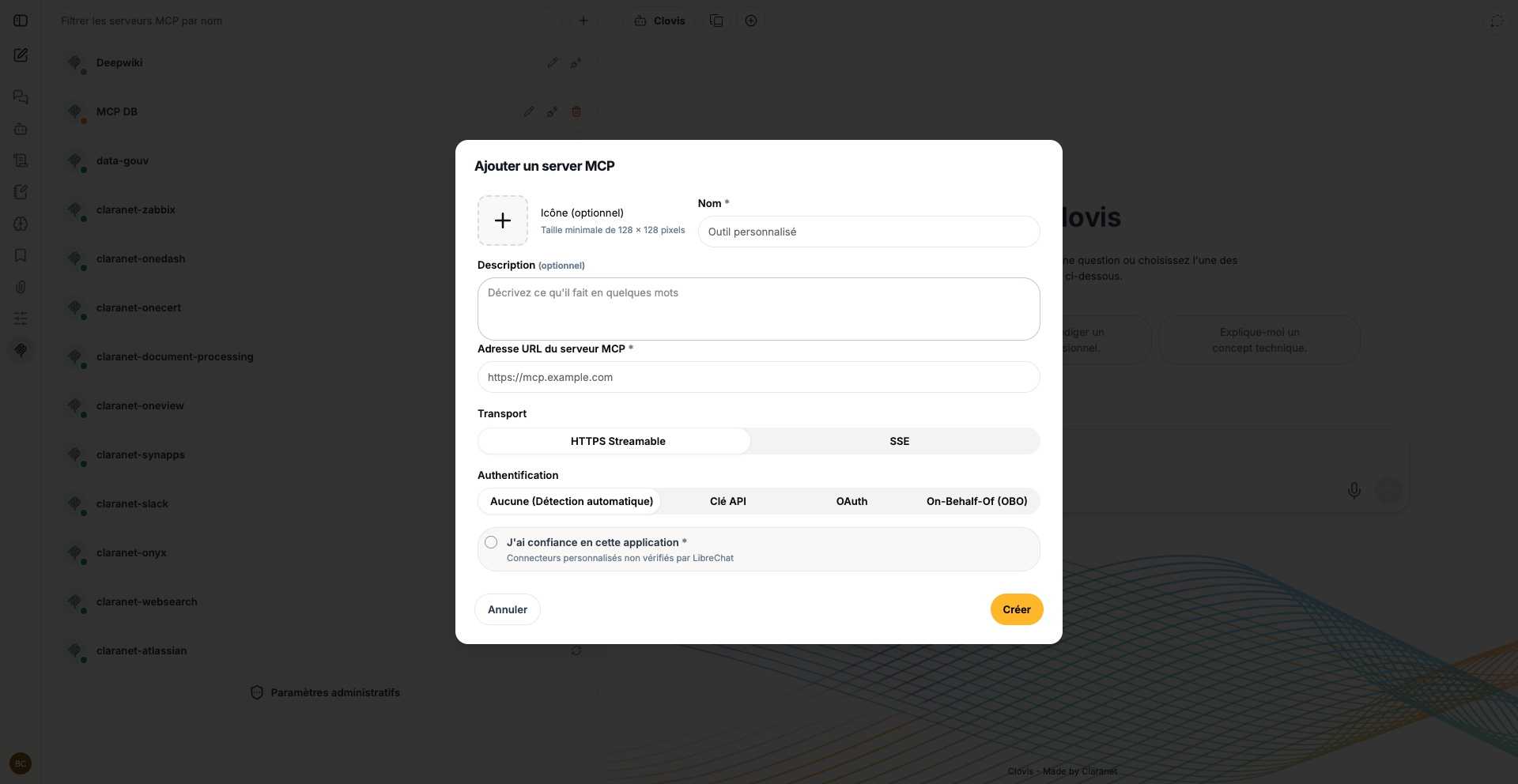
Enter the server name, description, and URL, then choose:
- the transport offered by the server, such as Streamable HTTPS or SSE;
- the appropriate authentication method: automatic detection, API key, OAuth, or On-Behalf-Of;
- the trust confirmation requested by the interface.
Select Create, then test the connection and exposed tools before associating them with an agent.
Add only servers approved by your organization. Check their owner, URL, accessible data, and permitted actions. Never enter a key or secret directly in a conversation.
MCP, skill, or agent?
| Element | Role |
|---|---|
| Agent | Combines a complete configuration for a given use case. |
| Skill | Describes the method for performing a task. |
| MCP server | Provides access to an external tool or source. |
Associate only the capabilities required for the agent's objective to keep its behavior clear and controlled.
MCP server examples
The following examples illustrate possible uses. They do not mean these connectors are automatically available in your Clovis environment.
| MCP | Purpose | Requirements |
|---|---|---|
| Confluence | Search procedures, summarize a page, or find a decision in authorized documentation spaces. | A compatible MCP server, the service URL, approved authentication, and permissions limited to the required spaces. |
| Salesforce | View authorized information about an account, opportunity, or sales activity and prepare a summary. | A Salesforce MCP server, an approved application or technical identity, minimum permissions, and clear rules for customer data. |
| GitHub | Search code, view issues and pull requests, or summarize repository activity. | A GitHub MCP server, authorized authentication, and access limited to the required organizations and repositories. |
Example requests
- Confluence: “Find the onboarding procedure for a new employee and identify the page used.”
- Salesforce: “Summarize the latest activities for the Acme account and list the recorded next steps.”
- GitHub: “Summarize the open pull requests in this repository and flag those awaiting review.”
Start with read-only access whenever possible. Allow write actions only after defining approvals, responsibilities, and rollback options.
Create files from the chat
Four separate MCPs let you create files from the chat:
- MCP Docs for PDF reports and Word documents.
- MCP XLS for Excel workbooks.
- MCP Draw.io for diagrams.
- MCP PPTX for PowerPoint presentations.