OCR with /v1/chat/completions
Endpoint
Chat Completions (Vision / OCR)
POST
/v1/chat/completionsFull URL (Clovis Gateway)
POST https://llm-gateway.clovis-ai.fr/v1/chat/completions
Authorization: Bearer <CLOVIS_API_KEY>
Content-Type: application/json
Available OCR modes
Clovis provides several ready-to-use modes, each corresponding to a predefined prompt. These modes allow you to adapt the model behavior depending on your needs: simple text extraction, structured OCR, element localization, or visual analysis. Some modes enable grounding to anchor the response within the visual structure of the document.
{
  "📋 Markdown": {
      "prompt": "<image>\n<|grounding|>Convert the document to markdown.",
      "has_grounding": true
  },
  "📝 Free OCR": {
      "prompt": "<image>\nFree OCR.",
      "has_grounding": false
  },
  "📍 Locate": {
      "prompt": "<image>\nLocate <|ref|>text<|/ref|> in the image.",
      "has_grounding": true
  },
  "🔍 Describe": {
      "prompt": "<image>\nDescribe this image in detail.",
      "has_grounding": false
  },
  "✏️ Custom": {
      "prompt": "",
      "has_grounding": false
  }
}
These modes can be used as-is or serve as a base to build custom prompts. The has_grounding field indicates whether the mode relies on visual grounding, which is particularly useful for Markdown conversion or precise content localization within the image.
Request structure
Request body (OCR example)
{
  "model": "ClovisOcr",
  "messages": [
      {
        "role": "user",
        "content": [
          {
            "type": "text",
            "text": "<image>\n<|grounding|> Convert the document to markdown."
          },
          {
            "type": "image_url",
            "image_url": {
                "url": "data:image/png;base64,AAAA..."
            }
          }
        ]
      }
  ],
  "temperature": 0,
  "max_tokens": 8000
}
Field description
| Field | Type | Required | Description |
|---|---|---|---|
| model | string | ✔️ | Embedding model name (ClovisOCR) |
| messages | array | ✔️ | Text (or list of texts) to process |
| temperature | float | User identifier (useful for traceability / logs) | |
| max_tokens | string | Embedding output format (e.g. float, base64) |
API Response
Response example
{
      "object": "chat.completion",
      "choices": [
          {
          "index": 0,
          "message": {
              "role": "assistant",
              "content": "## Invoice Total incl. tax: 123.45 €"
          },
          "finish_reason": "stop"
          }
      ],
      "usage": {
          "prompt_tokens": 540,
          "completion_tokens": 96,
          "total_tokens": 636
      }
  }
Free OCR
- Python
import base64
    from openai import OpenAI

    # Configuration
    CLOVIS_API_KEY = "YOURKEY"
    CLOVIS_BASE_URL = "https://llm-gateway.clovis-ai.fr/v1"
    OCR_MODEL_NAME = "ClovisOCR"

    # Initialize client
    client = OpenAI(api_key=CLOVIS_API_KEY, base_url=CLOVIS_BASE_URL)

    # Load and encode image
    with open("test_images/fake_invoice.jpeg", "rb") as image_file:
        base64_image = base64.b64encode(image_file.read()).decode("utf-8")

    data_url = f"data:image/jpeg;base64,{base64_image}"

    # Test OCR endpoint
    response = client.chat.completions.create(
        model=OCR_MODEL_NAME,
        messages=[
            {
                "role": "user",
                "content": [
                    {
                        "type": "text",
                        "text": "<image>\nFree OCR."
                    },
                    {
                        "type": "image_url",
                        "image_url": {"url": data_url}
                    }
                ]
            }
        ],
        temperature=0,
        max_tokens=8000
    )

    print(response.choices[0].message.content)
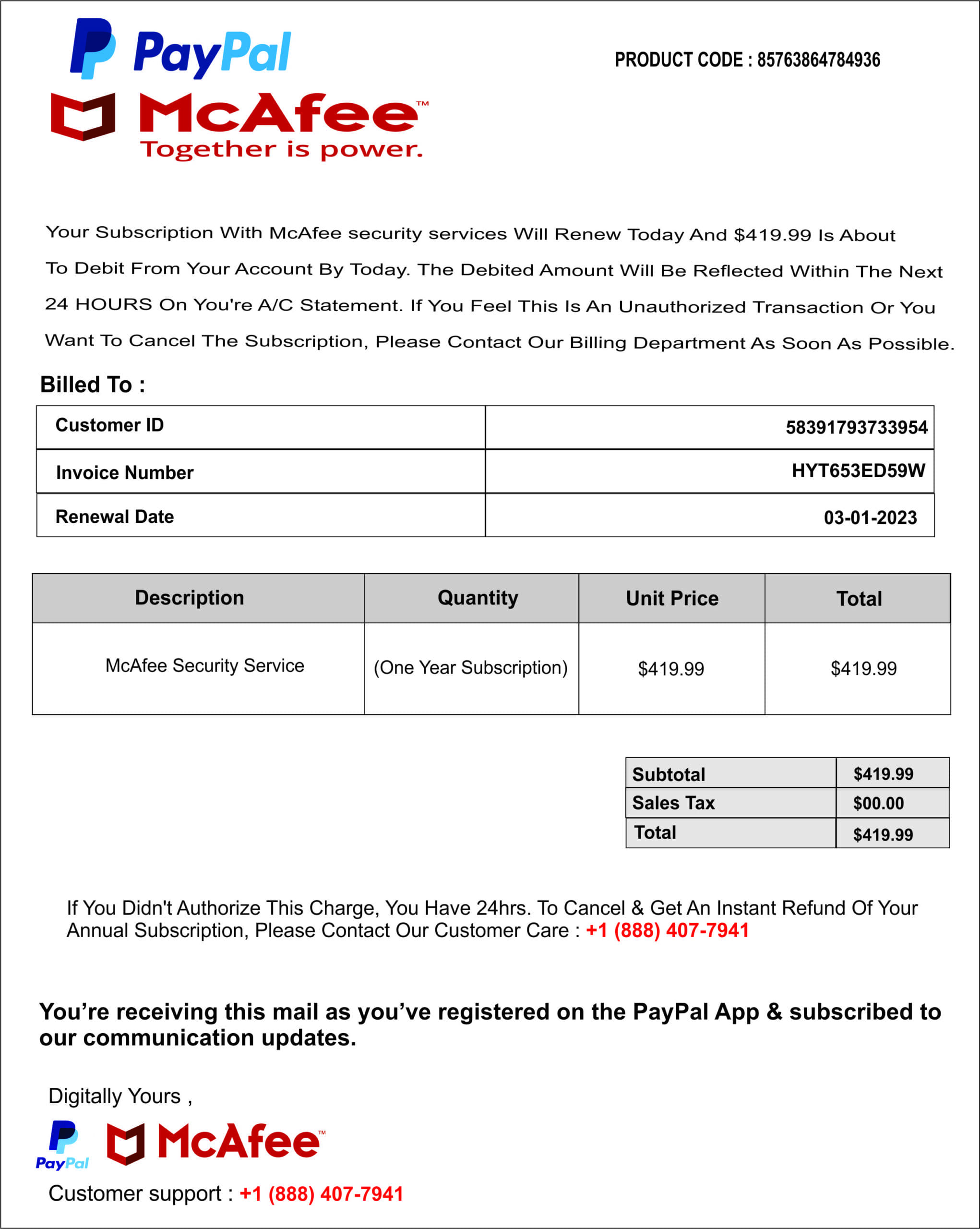
Free OCR response
Response example
Your Subscription With McAfee security services Will Renew Today And $419.99 Is About To Debit From Your Account By Today. The Debited Amount Will Be Reflected Within The Next 24 HOURS On You're A/C Statement. If You Feel This Is An Unauthorized Transaction Or You Want To Cancel The Subscription, Please Contact Our Billing Department As Soon As Possible.

  Billed To:

  | Customer ID | 58391793733954 |
  |-------------|------------------|
  | Invoice Number | HYT653ED59W |
  | Renewal Date | 03-01-2023 |

  | Description | Quantity | Unit Price | Total |
  |--------------|-----------|------------|-------|
  | McAfee Security Service | (One Year Subscription) | $419.99 | $419.99 |

  | Subtotal | $419.99 |
  | Sales Tax | $00.00 |
  | Total | $419.99 |

  If You Didn't Authorize This Charge, You Have 24hrs. To Cancel & Get An Instant Refund Of Your Annual Subscription, Please Contact Our Customer Care : +1 (888) 407-7941

  You're receiving this mail as you've registered on the PayPal App & subscribed to our communication updates.

  Digitally Yours,

  Customer support : +1 (888) 407-7941
Locate
- Python
import base64
    from openai import OpenAI

    # Configuration
    CLOVIS_API_KEY = "YOURKEY"
    CLOVIS_BASE_URL = "https://llm-gateway.clovis-ai.fr/v1"
    OCR_MODEL_NAME = "ClovisOCR"

    # Initialize client
    client = OpenAI(api_key=CLOVIS_API_KEY, base_url=CLOVIS_BASE_URL)

    # Load and encode image
    with open("test_images/fake_invoice.jpeg", "rb") as image_file:
        base64_image = base64.b64encode(image_file.read()).decode("utf-8")

    data_url = f"data:image/jpeg;base64,{base64_image}"

    # Test OCR endpoint
    response = client.chat.completions.create(
        model=OCR_MODEL_NAME,
        messages=[
            {
                "role": "user",
                "content": [
                    {
                        "type": "text",
                        "text": "<image>
Locate <|ref|>Customer ID<|/ref|> in the image."
                    },
                    {
                        "type": "image_url",
                        "image_url": {"url": data_url}
                    }
                ]
            }
        ],
        temperature=0,
        max_tokens=8000
    )

    print(response.choices[0].message.content)
Locate response
Response example
Customer ID[[31, 15, 349, 52]]
Convert to Markdown with Grounding
- Python
import base64
  from openai import OpenAI

  # Configuration
  CLOVIS_API_KEY = "YOURKEY"
  CLOVIS_BASE_URL = "https://llm-gateway.clovis-ai.fr/v1"
  OCR_MODEL_NAME = "ClovisOCR"

  # Initialize client
  client = OpenAI(api_key=CLOVIS_API_KEY, base_url=CLOVIS_BASE_URL)

  # Load and encode image
  with open("test_images/fake_invoice.jpeg", "rb") as image_file:
      base64_image = base64.b64encode(image_file.read()).decode("utf-8")

  data_url = f"data:image/jpeg;base64,{base64_image}"

  # Test OCR endpoint
  response = client.chat.completions.create(
      model=OCR_MODEL_NAME,
      messages=[
          {
              "role": "user",
              "content": [
                  {
                      "type": "text",
                      "text": "<image>
<|grounding|>Convert the document to markdown."
                  },
                  {
                      "type": "image_url",
                      "image_url": {"url": data_url}
                  }
              ]
          }
      ],
      temperature=0,
      max_tokens=8000
  )

  print(response.choices[0].message.content)
Markdown response with Grounding
Response example
text[[42, 180, 917, 198]]
Your Subscription With McAfee security services Will Renew Today And (419.99 Is About
text[[42, 210, 965, 227]]
To Debit From Your Account By Today. The Debited Amount Will Be Reflected Within The Next
text[[42, 240, 958, 256]]
24 HOURS On You're A/C Statement. If You Feel This Is An Unauthorized Transaction Or You
text[[42, 269, 973, 285]]
Want To Cancel The Subscription, Please Contact Our Billing Department As Soon As Possible.
title[[39, 303, 150, 321]]
# Billed To :
table[[39, 328, 956, 437]]
<table>Customer ID58391793733954Invoice NumberHYT653ED59WRenewal Date03-01-2023</table>
table[[30, 463, 969, 581]]
<table>DescriptionQuantityUnit PriceTotalMcAfee Security Service(One Year Subscription)$419.99$419.99</table>
table[[636, 613, 968, 689]]
<table>Subtotal$419.99Sales Tax$00.00Total$419.99</table>
text[[64, 728, 938, 764]]
If You Didn't Authorize This Charge, You Have 24hrs. To Cancel & Get An Instant Refund Of Your Annual Subscription, Please Contact Our Customer Care : +1 (888) 407-7941
text[[36, 812, 961, 851]]
**You're receiving this mail as you've registered on the PayPal App & subscribed to our communication updates.**
text[[47, 882, 198, 899]]
Digitally Yours,
image[[39, 907, 333, 952]]
text[[47, 961, 413, 978]]
Customer support : +1 (888) 407-7941
Describe
- Python
- Javascript
import base64
    from openai import OpenAI

    # Configuration
    CLOVIS_API_KEY = "YOURKEY"
    CLOVIS_BASE_URL = "https://llm-gateway.clovis-ai.fr/v1"
    OCR_MODEL_NAME = "ClovisOCR"

    # Initialize client
    client = OpenAI(api_key=CLOVIS_API_KEY, base_url=CLOVIS_BASE_URL)

    # Load and encode image
    with open("test_images/voiture.jpg", "rb") as image_file:
        base64_image = base64.b64encode(image_file.read()).decode("utf-8")

    data_url = f"data:image/jpg;base64,{base64_image}"

    # Test OCR endpoint
    response = client.chat.completions.create(
        model=OCR_MODEL_NAME,
        messages=[
            {
                "role": "user",
                "content": [
                    {
                        "type": "text",
                        "text": "<image>\nDescribe this image in detail."
                    },
                    {
                        "type": "image_url",
                        "image_url": {"url": data_url}
                    }
                ]
            }
        ],
        temperature=0,
        max_tokens=8000
    )

    print(response.choices[0].message.content)
async function testOcrChat() {
      try {

        const base64 = fs.readFileSync(path.join(__dirname, "voiture.png")).toString("base64");
        const dataUrl = 'data:image/png;base64,' + base64;

        const payload = {
          model: process.env.OCR_MODEL,
          messages: [
            {
              role: "user",
              content: [
                {
                  type: "text",
                  text:
                    "<image>\nDescribe this image in detail."
                },
                { type: "image_url", image_url: { url: dataUrl } }
              ]
            }
          ],
          temperature: 0,
          max_tokens: 8000
        };


        // Useful debug (without spamming the console with the entire dataUrl)
        console.log("Sending model:", payload.model);
        console.log("Image base64 length:", base64.length);

        const res = await axios.post(`${baseURL}/chat/completions`, payload, {
        headers: {
          Authorization: `Bearer ${process.env.OPENAI_API_KEY}`,
          "Content-Type": "application/json",
        },
      });

      console.log("OK");
      console.log(JSON.stringify(res.data, null, 2));
      return true;
    } catch (err) {
      console.error("failed:", err.response?.status, err.response?.data || err.message);
      return false;
    }
Describe response
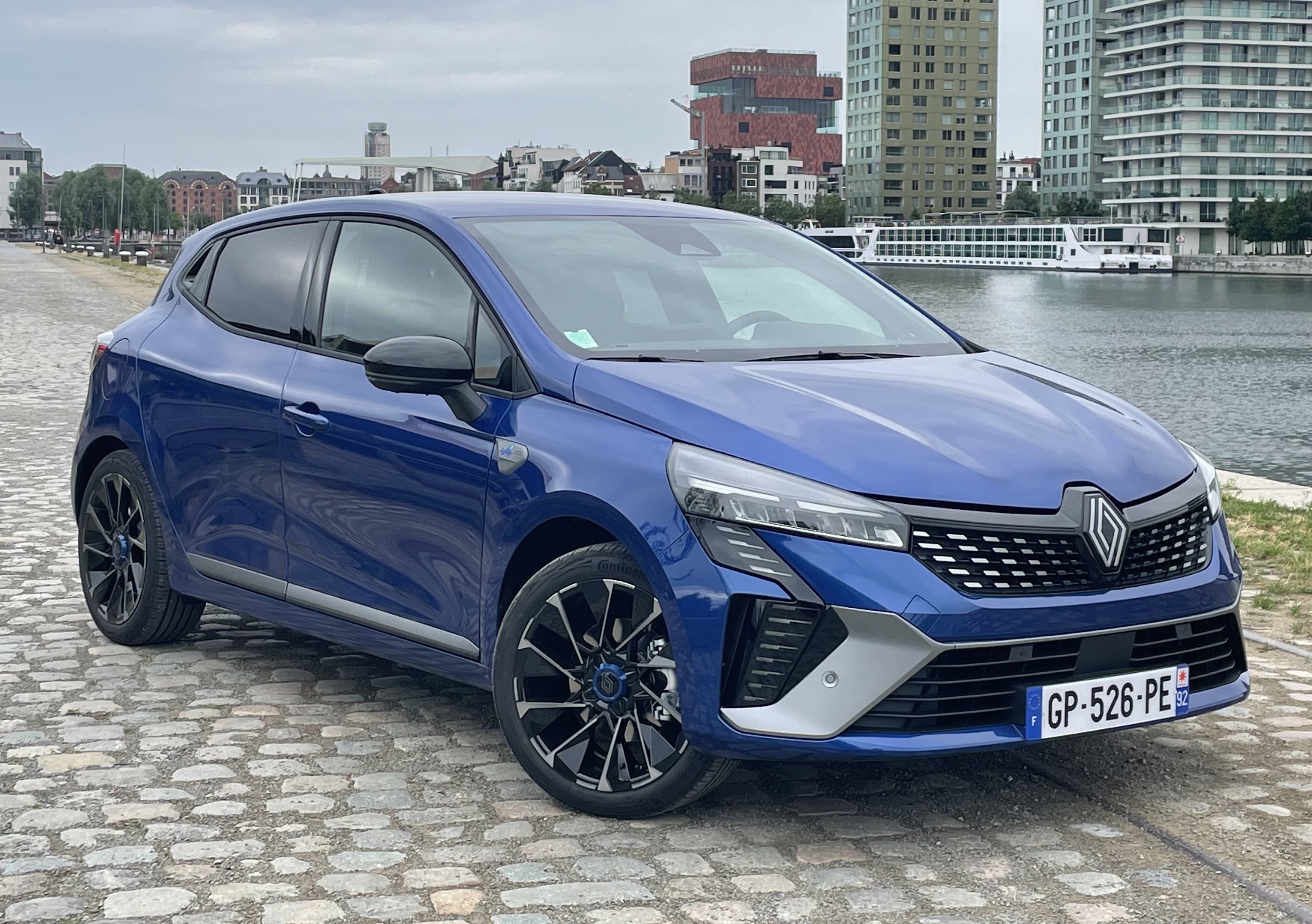
Response example
A blue Renault SUV parked on cobblestone pavement beside waterfront buildings that include modern high-rise structures and older brick architecture. The vehicle is positioned at an angle to showcase both sides of it clearly; front left side facing towards us while rear right visible from behind. It has black alloy wheels fitted onto silver hubcaps featuring the Renault logo prominently displayed above them. A European-style license plate reads "GP-526-PE" mounted below the grille which consists of horizontal slats flanked by two large air intakes. The car's design includes sleek headlights integrated into angular bodywork, giving off a contemporary look enhanced further by tinted windows for privacy or sun protection. In the background, there are several multi-story residential towers alongside what appears to be either a riverbank promenade lined with trees or a lakeside walkway where boats can dock. Overcast skies suggest cloudy weather conditions during daytime hours.
OCR / DeepSearch best practices
- temperature: 0 for maximum reliability
- Use
<|grounding|>for structured documents - Use
<|ref|>for targeted searches - Prefer clear images (high contrast)
- Split multi-page documents
Quick summary
| Mode | Grounding | Usage |
|---|---|---|
| Markdown | ✔️ | Structured document OCR |
| Free OCR | ❌ | Raw text |
| Locate | ✔️ | Localization |
| Describe | ❌ | Vision |
| Custom | optional | Advanced use cases |