OCR avec /v1/chat/completions
Endpoint
Chat Completions (Vision / OCR)
POST
/v1/chat/completionsURL complète (Gateway Clovis)
POST https://llm-gateway.clovis-ai.fr/v1/chat/completions
Authorization: Bearer <CLOVIS_API_KEY>
Content-Type: application/json
Modes OCR disponibles
Clovis propose plusieurs modes prêts à l’emploi, chacun correspondant à un prompt prédéfini. Ces modes permettent d’adapter le comportement du modèle selon le besoin : extraction simple de texte, OCR structuré, localisation d’éléments ou analyse visuelle. Certains modes activent le grounding afin d’ancrer la réponse dans la structure visuelle du document.
{
  "📋 Markdown": {
      "prompt": "<image>\n<|grounding|>Convert the document to markdown.",
      "has_grounding": true
  },
  "📝 Free OCR": {
      "prompt": "<image>\nFree OCR.",
      "has_grounding": false
  },
  "📍 Locate": {
      "prompt": "<image>\nLocate <|ref|>text<|/ref|> in the image.",
      "has_grounding": true
  },
  "🔍 Describe": {
      "prompt": "<image>\nDescribe this image in detail.",
      "has_grounding": false
  },
  "✏️ Custom": {
      "prompt": "",
      "has_grounding": false
  }
}
Ces modes peuvent être utilisés tels quels ou servir de base pour construire des prompts personnalisés. Le champ has_grounding indique si le mode s’appuie sur l’ancrage visuel, utile notamment pour la conversion en Markdown ou la localisation précise de contenu dans l’image.
Structure de la requête
Corps de requête (exemple OCR)
{
  "model": "ClovisOcr",
  "messages": [
      {
        "role": "user",
        "content": [
          {
            "type": "text",
            "text": "<image>\n<|grounding|> Convert the document to markdown."
          },
          {
            "type": "image_url",
            "image_url": {
                "url": "data:image/png;base64,AAAA..."
            }
          }
        ]
      }
  ],
  "temperature": 0,
  "max_tokens": 8000
}
Description des champs
| Champ | Type | Obligatoire | Description |
|---|---|---|---|
| model | string | ✔️ | Nom du modèle d’embedding (ClovisOCR) |
| messages | array | ✔️ | Texte (ou liste de textes) à convertir |
| temperature | float | Identifiant utilisateur (utile pour traçabilité / logs) | |
| max_tokens | string | Format de sortie de l’embedding (ex: float, base64 ) |
Réponse de l’API
Exemple de réponse
{
      "object": "chat.completion",
      "choices": [
          {
          "index": 0,
          "message": {
              "role": "assistant",
              "content": "## Facture Total TTC : 123,45 €"
          },
          "finish_reason": "stop"
          }
      ],
      "usage": {
          "prompt_tokens": 540,
          "completion_tokens": 96,
          "total_tokens": 636
      }
  }
Free OCR
- Python
import base64
    from openai import OpenAI

    # Configuration
    CLOVIS_API_KEY = "YOURKEY"
    CLOVIS_BASE_URL = "https://llm-gateway.clovis-ai.fr/v1"
    OCR_MODEL_NAME = "ClovisOCR"

    # Initialize client
    client = OpenAI(api_key=CLOVIS_API_KEY, base_url=CLOVIS_BASE_URL)

    # Load and encode image
    with open("test_images/fake_invoice.jpeg", "rb") as image_file:
        base64_image = base64.b64encode(image_file.read()).decode("utf-8")

    data_url = f"data:image/jpeg;base64,{base64_image}"

    # Test OCR endpoint
    response = client.chat.completions.create(
        model=OCR_MODEL_NAME,
        messages=[
            {
                "role": "user",
                "content": [
                    {
                        "type": "text",
                        "text": "<image>\nFree OCR."
                    },
                    {
                        "type": "image_url",
                        "image_url": {"url": data_url}
                    }
                ]
            }
        ],
        temperature=0,
        max_tokens=8000
    )

    print(response.choices[0].message.content)
Réponse Free OCR
Exemple de réponse
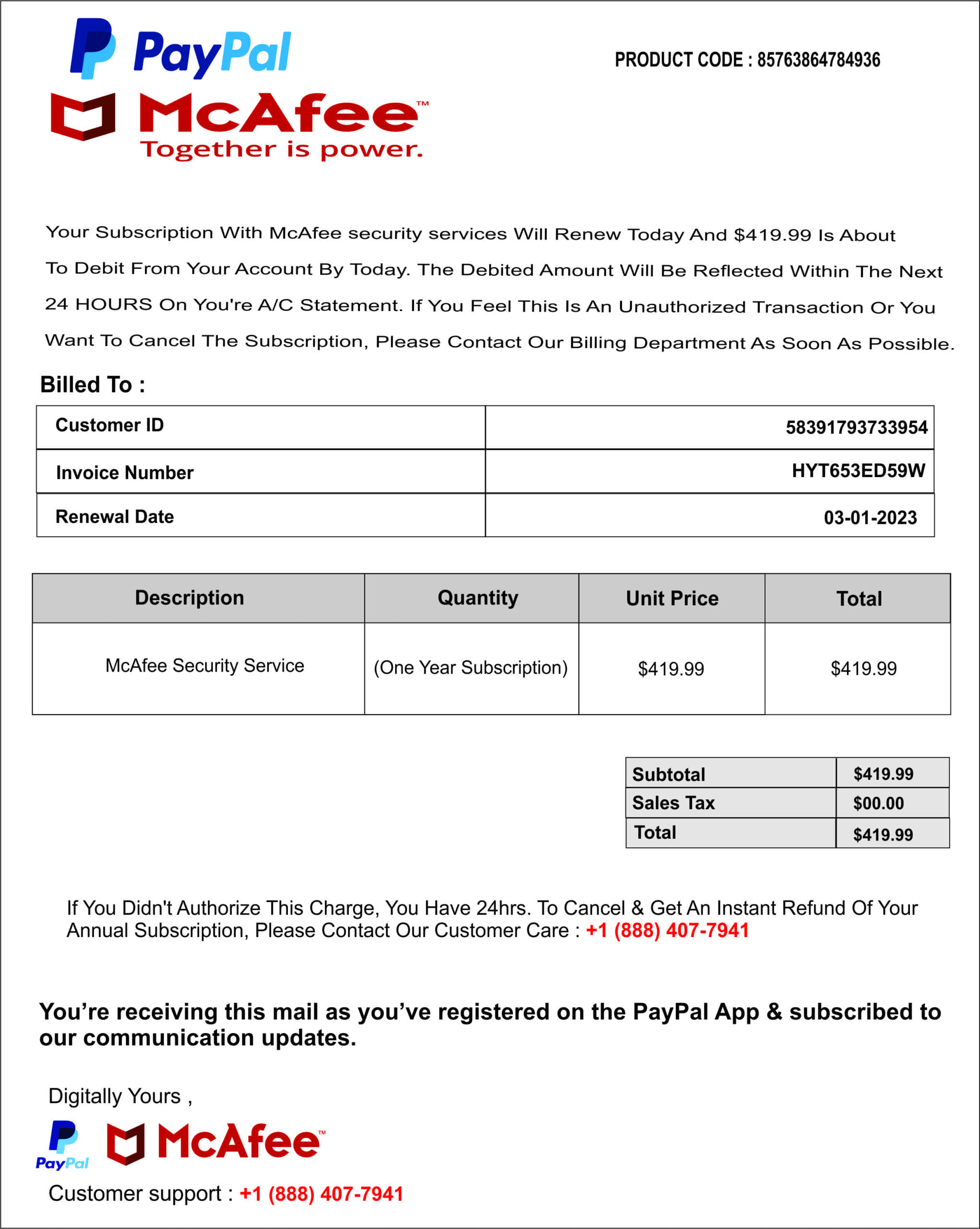
Your Subscription With McAfee security services Will Renew Today And $419.99 Is About To Debit From Your Account By Today. The Debited Amount Will Be Reflected Within The Next 24 HOURS On You're A/C Statement. If You Feel This Is An Unauthorized Transaction Or You Want To Cancel The Subscription, Please Contact Our Billing Department As Soon As Possible.

  Billed To:

  | Customer ID | 58391793733954 |
  |-------------|------------------|
  | Invoice Number | HYT653ED59W |
  | Renewal Date | 03-01-2023 |

  | Description | Quantity | Unit Price | Total |
  |--------------|-----------|------------|-------|
  | McAfee Security Service | (One Year Subscription) | $419.99 | $419.99 |

  | Subtotal | $419.99 |
  | Sales Tax | $00.00 |
  | Total | $419.99 |

  If You Didn't Authorize This Charge, You Have 24hrs. To Cancel & Get An Instant Refund Of Your Annual Subscription, Please Contact Our Customer Care : +1 (888) 407-7941

  You're receiving this mail as you've registered on the PayPal App & subscribed to our communication updates.

  Digitally Yours,

  Customer support : +1 (888) 407-7941
Locate
- Python
import base64
    from openai import OpenAI

    # Configuration
    CLOVIS_API_KEY = "YOURKEY"
    CLOVIS_BASE_URL = "https://llm-gateway.clovis-ai.fr/v1"
    OCR_MODEL_NAME = "ClovisOCR"

    # Initialize client
    client = OpenAI(api_key=CLOVIS_API_KEY, base_url=CLOVIS_BASE_URL)

    # Load and encode image
    with open("test_images/fake_invoice.jpeg", "rb") as image_file:
        base64_image = base64.b64encode(image_file.read()).decode("utf-8")

    data_url = f"data:image/jpeg;base64,{base64_image}"

    # Test OCR endpoint
    response = client.chat.completions.create(
        model=OCR_MODEL_NAME,
        messages=[
            {
                "role": "user",
                "content": [
                    {
                        "type": "text",
                        "text": "<image>
Locate <|ref|>Customer ID<|/ref|> in the image."
                    },
                    {
                        "type": "image_url",
                        "image_url": {"url": data_url}
                    }
                ]
            }
        ],
        temperature=0,
        max_tokens=8000
    )

    print(response.choices[0].message.content)
Réponse de Locate
Exemple de réponse
Customer ID[[31, 15, 349, 52]]
Convert to Markdown avec Grounding
- Python
import base64
  from openai import OpenAI

  # Configuration
  CLOVIS_API_KEY = "YOURKEY"
  CLOVIS_BASE_URL = "https://llm-gateway.clovis-ai.fr/v1"
  OCR_MODEL_NAME = "ClovisOCR"

  # Initialize client
  client = OpenAI(api_key=CLOVIS_API_KEY, base_url=CLOVIS_BASE_URL)

  # Load and encode image
  with open("test_images/fake_invoice.jpeg", "rb") as image_file:
      base64_image = base64.b64encode(image_file.read()).decode("utf-8")

  data_url = f"data:image/jpeg;base64,{base64_image}"

  # Test OCR endpoint
  response = client.chat.completions.create(
      model=OCR_MODEL_NAME,
      messages=[
          {
              "role": "user",
              "content": [
                  {
                      "type": "text",
                      "text": "<image>
<|grounding|>Convert the document to markdown."
                  },
                  {
                      "type": "image_url",
                      "image_url": {"url": data_url}
                  }
              ]
          }
      ],
      temperature=0,
      max_tokens=8000
  )

  print(response.choices[0].message.content)
Réponse Markdown avec Grounding
Exemple de réponse
text[[42, 180, 917, 198]]
Your Subscription With McAfee security services Will Renew Today And (419.99 Is About
text[[42, 210, 965, 227]]
To Debit From Your Account By Today. The Debited Amount Will Be Reflected Within The Next
text[[42, 240, 958, 256]]
24 HOURS On You're A/C Statement. If You Feel This Is An Unauthorized Transaction Or You
text[[42, 269, 973, 285]]
Want To Cancel The Subscription, Please Contact Our Billing Department As Soon As Possible.
title[[39, 303, 150, 321]]
# Billed To :
table[[39, 328, 956, 437]]
<table>Customer ID58391793733954Invoice NumberHYT653ED59WRenewal Date03-01-2023</table>
table[[30, 463, 969, 581]]
<table>DescriptionQuantityUnit PriceTotalMcAfee Security Service(One Year Subscription)$419.99$419.99</table>
table[[636, 613, 968, 689]]
<table>Subtotal$419.99Sales Tax$00.00Total$419.99</table>
text[[64, 728, 938, 764]]
If You Didn't Authorize This Charge, You Have 24hrs. To Cancel & Get An Instant Refund Of Your Annual Subscription, Please Contact Our Customer Care : +1 (888) 407-7941
text[[36, 812, 961, 851]]
**You're receiving this mail as you've registered on the PayPal App & subscribed to our communication updates.**
text[[47, 882, 198, 899]]
Digitally Yours,
image[[39, 907, 333, 952]]
text[[47, 961, 413, 978]]
Customer support : +1 (888) 407-7941
Describe
- Python
- Javascript
import base64
    from openai import OpenAI

    # Configuration
    CLOVIS_API_KEY = "YOURKEY"
    CLOVIS_BASE_URL = "https://llm-gateway.clovis-ai.fr/v1"
    OCR_MODEL_NAME = "ClovisOCR"

    # Initialize client
    client = OpenAI(api_key=CLOVIS_API_KEY, base_url=CLOVIS_BASE_URL)

    # Load and encode image
    with open("test_images/voiture.jpg", "rb") as image_file:
        base64_image = base64.b64encode(image_file.read()).decode("utf-8")

    data_url = f"data:image/jpg;base64,{base64_image}"

    # Test OCR endpoint
    response = client.chat.completions.create(
        model=OCR_MODEL_NAME,
        messages=[
            {
                "role": "user",
                "content": [
                    {
                        "type": "text",
                        "text": "<image>\nDescribe this image in detail."
                    },
                    {
                        "type": "image_url",
                        "image_url": {"url": data_url}
                    }
                ]
            }
        ],
        temperature=0,
        max_tokens=8000
    )

    print(response.choices[0].message.content)
async function testOcrChat() {
      try {

        const base64 = fs.readFileSync(path.join(__dirname, "voiture.png")).toString("base64");
        const dataUrl = 'data:image/png;base64,' + base64;

        const payload = {
          model: process.env.OCR_MODEL,
          messages: [
            {
              role: "user",
              content: [
                {
                  type: "text",
                  text:
                    "<image>\nDescribe this image in detail."
                },
                { type: "image_url", image_url: { url: dataUrl } }
              ]
            }
          ],
          temperature: 0,
          max_tokens: 8000
        };


        // Debug utile (sans spammer la console avec toute la dataUrl)
        console.log("Sending model:", payload.model);
        console.log("Image base64 length:", base64.length);

        const res = await axios.post(`${baseURL}/chat/completions`, payload, {
        headers: {
          Authorization: `Bearer ${process.env.OPENAI_API_KEY}`,
          "Content-Type": "application/json",
        },
      });

      console.log("OK");
      console.log(JSON.stringify(res.data, null, 2));
      return true;
    } catch (err) {
      console.error("failed:", err.response?.status, err.response?.data || err.message);
      return false;
    }
Réponse de Describe
Exemple de réponse
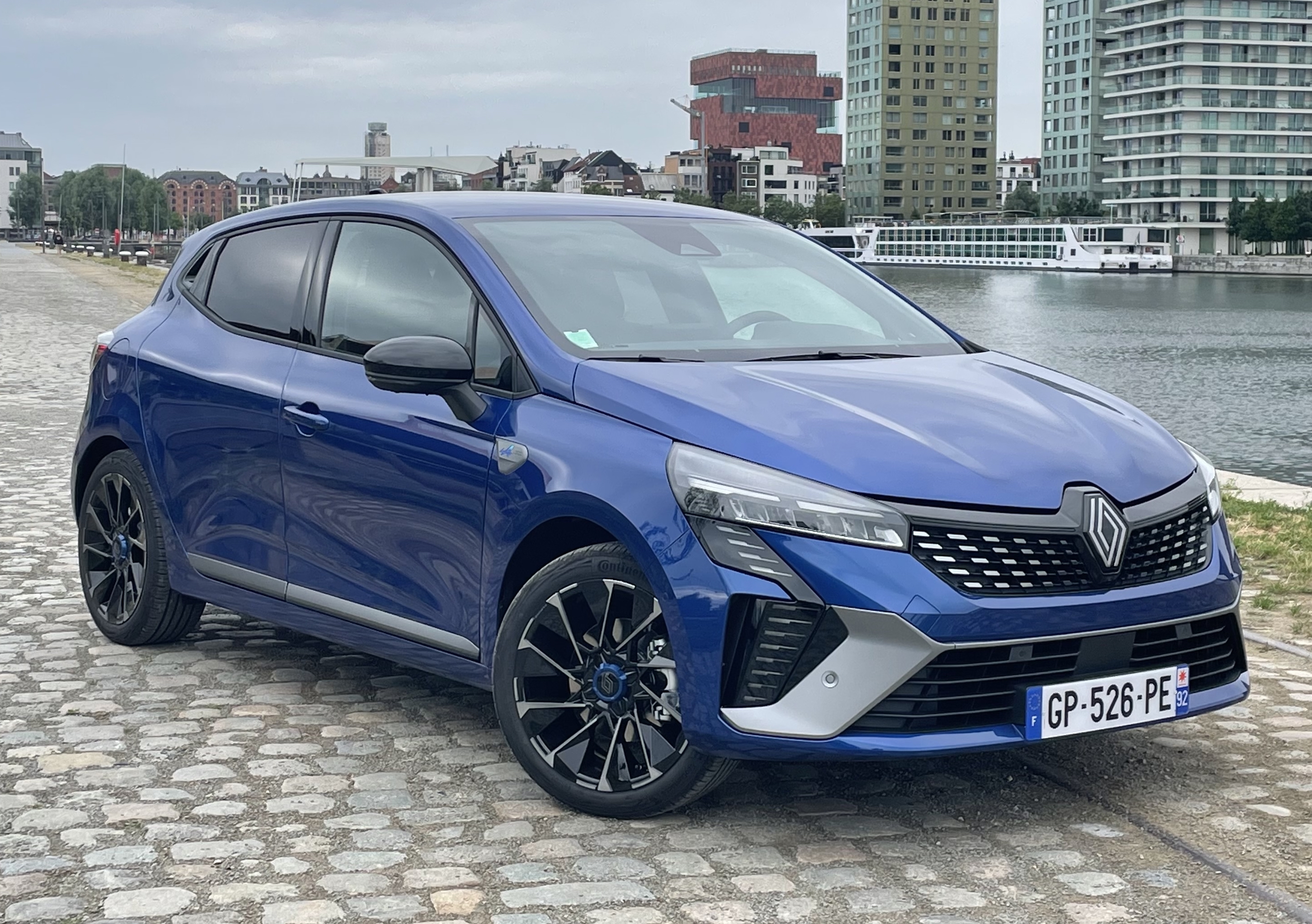
A blue Renault SUV parked on cobblestone pavement beside waterfront buildings that include modern high-rise structures and older brick architecture. The vehicle is positioned at an angle to showcase both sides of it clearly; front left side facing towards us while rear right visible from behind. It has black alloy wheels fitted onto silver hubcaps featuring the Renault logo prominently displayed above them. A European-style license plate reads "GP-526-PE" mounted below the grille which consists of horizontal slats flanked by two large air intakes. The car's design includes sleek headlights integrated into angular bodywork, giving off a contemporary look enhanced further by tinted windows for privacy or sun protection. In the background, there are several multi-story residential towers alongside what appears to be either a riverbank promenade lined with trees or a lakeside walkway where boats can dock. Overcast skies suggest cloudy weather conditions during daytime hours.
Bonnes pratiques OCR / DeepSearch
- temperature: 0 pour fiabilité maximale
- Utiliser
<|grounding|>pour documents structurés - Utiliser
<|ref|>pour recherches ciblées - Préférer images nettes (contraste élevé)
- Découper les documents multi-pages
Résumé rapide
| Mode | Grounding | Usage |
|---|---|---|
| Markdown | ✔️ | OCR document structuré |
| Free OCR | ❌ | Texte brut |
| Locate | ✔️ | Localisation |
| Describe | ❌ | Vision |
| Custom | optionnel | Cas avancés |